Timers not starting after macOS 26.4 update (Timelime 3.7)

Hi,

since updating to macOS 26.4, I can no longer start timers in Timelime (version 3.7).

Issue:

  • Clicking “Start” on a timer does nothing

  • No error message, no feedback

  • App otherwise seems responsive

Environment:

  • macOS 26.4 (latest update)

  • Timelime 3.7

  • Mac (Apple Silicon)

What I already tried:

  • Restarting the app

  • Restarting the Mac

Before the macOS update, everything worked fine. Is this a known issue with macOS 26.4?

Thanks!

1 Like

Hi Karen,

Thank you for writing about this bug!
I’m aware and currently working on a fix. I’ll release an update to Timelime as soon as possible. Thank you for your patience!

There is a temporary workaround that should fix the issues you are experiencing.

Here’s what to do:

  1. Delete Timelime from your Applications folder

  2. Re-download Timelime from the App Store

  3. Disconnect your Mac from the Internet

  4. Launch Timelime

  5. Reconnect to the Internet

1 Like

Hi Nico,

Thanks so much for the quick fix and the clear workaround instructions — really appreciate it!

I updated to Timelime 3.7.1 and followed your steps, and everything is working perfectly again :tada:

Hello niko,

I’m same problem, but not working in my case :frowning: . I can’t start timer after to apply your steps.

Thanks to help

Hi Nico,

Had the same problem as mentioned by Karen_Lorne. Tried your suggested temporary fix and Time Lime seems to be working again. Thank you so much for this quick response and fix!

Hi there,

thx for the fast responses and help!

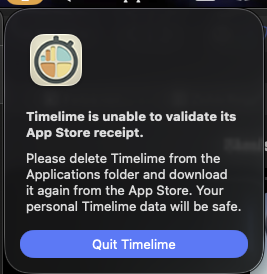
Here the same problem and there came a window which said delete and download again from Apptstore. Neither that nor your workaround helped here but nice that something is happening.

Thx, Ollie

This error comes now regularly and Timelime shuts itself down (although I DID delte Timelime and downloaded again).

The latest release (version 3.7.2) should fix the problem with the App Store receipt.
Can you please check. Thank you!

1 Like

Yes, works here on MBP M2 Max and macOS 26.4.

Thank you so much for the fast response! Perfect support, well appreciated!

1 Like