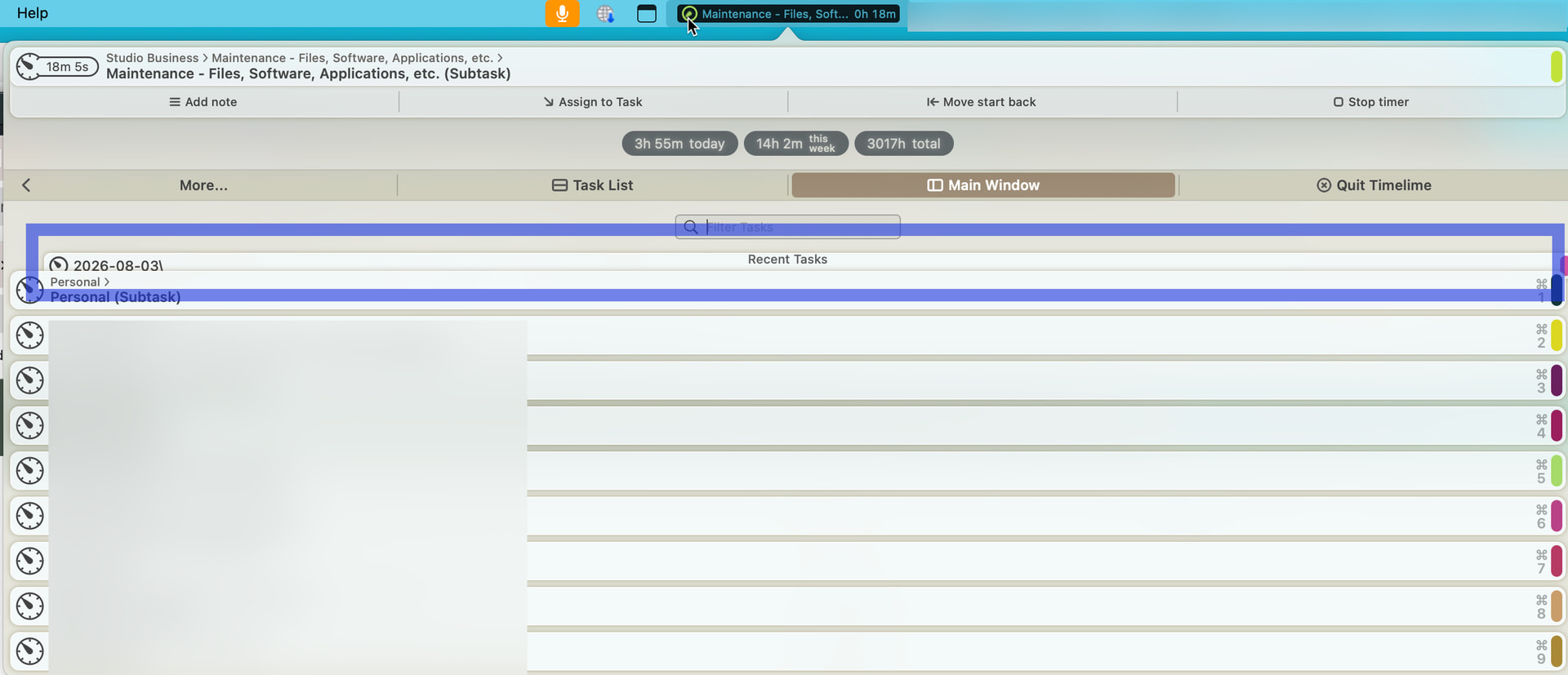
I accidentally created a task with a backslash at the end of the name. Since then, the task appears in the dropdown as shown below. The task name is 2026-08-03\
It appears partially overlapped by the Heading “Recent Tasks” and the list.
I have a correctly named task (without the backslash). If I click on the stray item, it will start a timing for the task. Please, how do I get rid of the orphaned item? Thank you.
Thanks for letting me know, I’ll have to investigate…
Did you already delete the Task named “2026-08-03\”?
Which version of macOS and Timelime are you running?
I don’t know if the Task named “2026-08-03\” is deleted. It doesn’t show in my task list. The task with the corrected name, “2026-08-03” without the backslash shows in the task list. The only place the task with the backslash appears is in the dropdown as shown in the screenshot I provided. Clicking there does start a timer on the task without the backslash.
I’m running MacOS 14.8.8 (Sonoma) and TimeLime 3.8.1
Thank you for the response!
Okay, if the Task named “2026-08-03\” doesn’t appear in the Task list of the Main Window, it is deleted already.
Then it’s just a UI issue in menu bar dropdown. I’ll look into fixing it for the next update, thanks again for the report.
For now, please just relaunch Timelime, and it should be back to normal.